# 《HelloGitHub》第 08 期
> 兴趣是最好的老师,**HelloGitHub** 让你对开源感兴趣!

## 目录
点击右上角的 **「目录」** 图标打开目录,获得更好的阅读体验。

**Tips**:如果遇到图片刷不出来的情况,[点击](https://hellogithub.com/periodical/volume/08) 换一种浏览方式。

关注「HelloGitHub」公众号,第一时间收到推送
## 内容
> **以下为本期内容**|每月 **28** 号更新
### C# 项目
1、[Newtonsoft.Json](https://hellogithub.com/periodical/statistics/click?target=https://github.com/JamesNK/Newtonsoft.Json):Newtonsoft.Json 是一款 .NET 平台中开源的 JSON 序列化和反序列化类库,示例代码:
```
public class Account
{
public string Email { get; set; }
public bool Active { get; set; }
public DateTime CreatedDate { get; set; }
public IList Roles { get; set; }
}
Account account = new Account
{
Email = "james@example.com",
Active = true,
CreatedDate = new DateTime(2013, 1, 20, 0, 0, 0, ateTimeKind.Utc),
Roles = new List
{
"User",
"Admin"
}
};
string json = JsonConvert.SerializeObject(account, Formatting.Indented);
// {
// "Email": "james@example.com",
// "Active": true,
// "CreatedDate": "2013-01-20T00:00:00Z",
// "Roles": [
// "User",
// "Admin"
// ]
// }
Console.WriteLine(json);
```
### C++ 项目
2、[libco](https://hellogithub.com/periodical/statistics/click?target=https://github.com/Tencent/libco):腾讯的开源项目——libco 是微信后台大规模使用的 C/C++ 协程库,2013 年至今稳定运行在微信后台的数万台机器上。
- 无需侵入业务逻辑,把多进程、多线程服务改造成协程服务,并发能力得到百倍提升
- 支持 CGI 框架,轻松构建 Web 服务
- 支持 gethostbyname、mysqlclient、ssl 等常用第三方库
- 可选的共享栈模式,单机轻松接入千万连接
- 完善简洁的协程编程接口
- 类 pthread 接口设计,通过 co_create、co_resume 等简单清晰接口即可完成协程的创建与恢复
- \_\_thread 的协程私有变量、协程间通信的协程信号量 co_signal
- 语言级别的 lambda 实现,结合协程原地编写并执行后台异步任务
- 基于 epoll/kqueue 实现的小而轻的网络框架,基于时间轮盘实现的高性能定时器
### Go 项目
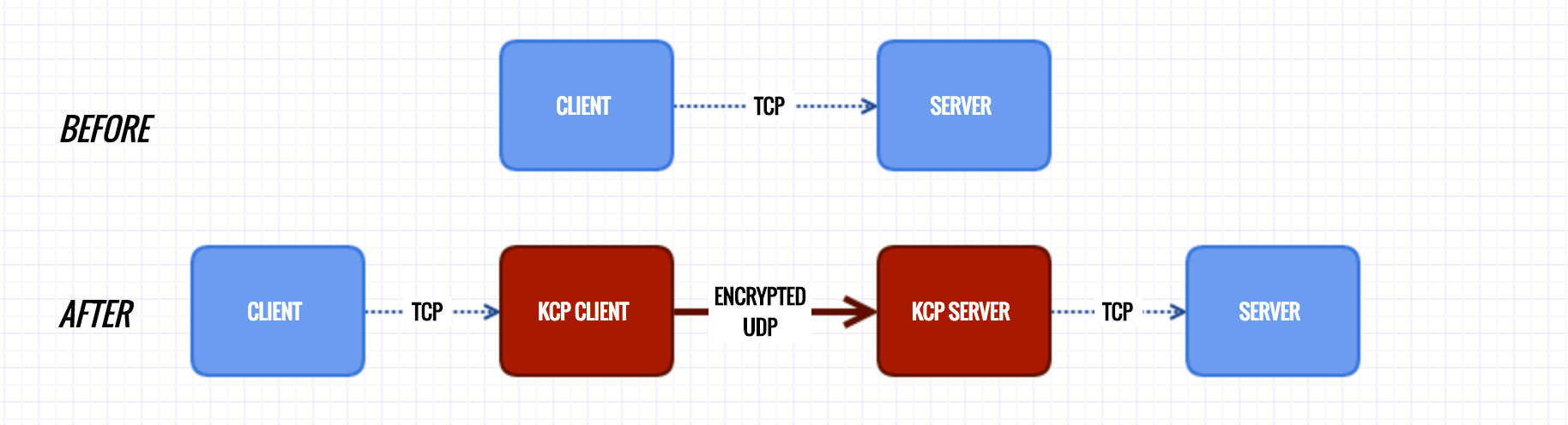
3、[kcptun](https://hellogithub.com/periodical/statistics/click?target=https://github.com/xtaci/kcptun):也许是世界上最快的 UDP 传输工具,支持 macOS/Linux/Windows/FreeBSD/ARM/Raspberry Pi/OpenWrt。
### Java 项目
4、[AndroidUtilCode](https://hellogithub.com/periodical/statistics/click?target=https://github.com/Blankj/AndroidUtilCode):Android 开发人员不得不收集的代码,[中文介绍](https://github.com/Blankj/AndroidUtilCode/blob/master/README-CN.md)
5、[DanmakuFlameMaster](https://hellogithub.com/periodical/statistics/click?target=https://github.com/bilibili/DanmakuFlameMaster):Bilibili 开源的 Android 开源弹幕引擎·烈焰弹幕使。特性:
- 使用多种方式(View/SurfaceView/TextureView)实现高效绘制
- 该站 XML 弹幕格式解析
- 基础弹幕精确还原绘制
- 支持 mode7 特殊弹幕
- 多核机型优化,高效的预缓存机制
- 支持多种显示效果选项实时切换
- 实时弹幕显示支持
- 换行弹幕支持/运动弹幕支持
- 支持自定义字体
- 支持多种弹幕参数设置
- 支持多种方式的弹幕屏蔽
### JavaScript 项目
6、[atrament](https://hellogithub.com/periodical/statistics/click?target=https://github.com/jakubfiala/atrament):极小的 JavaScript 画板,[在线演示](http://fiala.uk/atrament.js/demo/)

7、[incubator-weex](https://hellogithub.com/periodical/statistics/click?target=https://github.com/apache/incubator-weex):移动端,跨平台前端框架,[详细的中文档](https://weex-project.io/cn/guide/)
### Python 项目
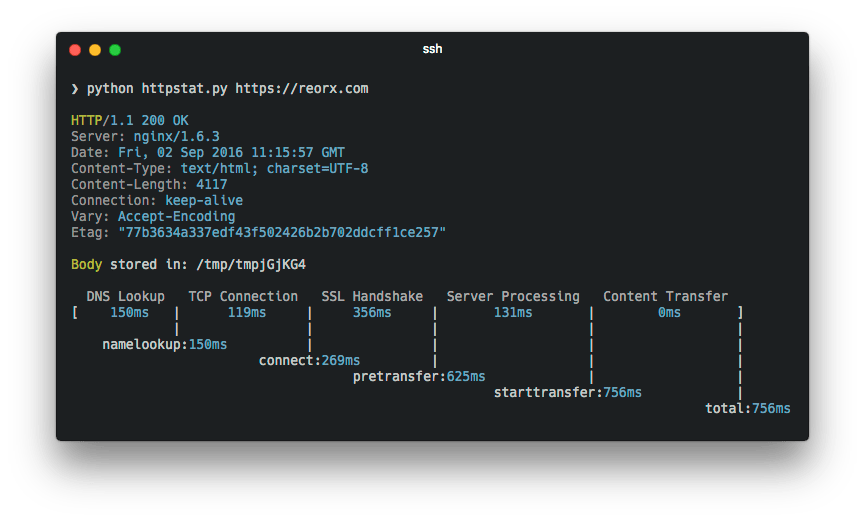
8、[httpstat](https://hellogithub.com/periodical/statistics/click?target=https://github.com/reorx/httpstat):httpstat 美化了 `curl` 的结果,使得结果更加可读。同时它无依赖、兼容 Python3、一共才 300 多行。还可以显示 HTTP 请求的每个过程中消耗的时间,如下图:
9、[PyMySQL](https://hellogithub.com/periodical/statistics/click?target=https://github.com/PyMySQL/PyMySQL):纯 Pyton 写的 MySQL 库,纯 Python 的好处就是可以运行在任何装有 Python 解释器(CPython、PyPy、IronPython)的平台上。相对于 [MySQLdb](https://github.com/farcepest/MySQLdb1) 性能几乎一样,使用方法也一样,但是 **PyMySQL 安装方法极其简单**——`pip install PyMySQL`,PyMySQL 使用示例代码:
```
# 下面为例子需要的数据库的建表语句
CREATE TABLE `users` (
`id` int(11) NOT NULL AUTO_INCREMENT,
`email` varchar(255) COLLATE utf8_bin NOT NULL,
`password` varchar(255) COLLATE utf8_bin NOT NULL,
PRIMARY KEY (`id`)
) ENGINE=InnoDB DEFAULT CHARSET=utf8 COLLATE=utf8_bin
AUTO_INCREMENT=1 ;
```
```python
# -*- coding: utf-8 -*-
import pymysql.cursors
# 连接数据库
connection = pymysql.connect(host='localhost',
user='user',
password='passwd',
db='db',
charset='utf8mb4',
cursorclass=pymysql.cursors.DictCursor)
try:
with connection.cursor() as cursor:
# 创建一个新的纪录(record)
sql = "INSERT INTO `users` (`email`, `password`) VALUES (%s, %s)"
cursor.execute(sql, ('webmaster@python.org', 'very-secret'))
# 连接不会自动提交,所以你想下面要调用 commit 方法,存储对数据库的改动
connection.commit()
with connection.cursor() as cursor:
sql = "SELECT `id`, `password` FROM `users` WHERE `email`=%s"
cursor.execute(sql, ('webmaster@python.org',))
# 获取一条的纪录(record)
result = cursor.fetchone()
print(result) # 结果输出:{'password': 'very-secret', 'id': 1}
finally:
connection.close() # 操作完数据库一要记得调用 close 方法,关闭连接
```
10、[reddit](https://hellogithub.com/periodical/statistics/click?target=https://github.com/reddit-archive/reddit):[reddit.com](https://www.reddit.com/) 网站的源码,通过这个项目,可以学习 Python 在构建大型项目中的使用、项目结构、代码风格、Python 技巧的使用方法等。[安装教程](https://github.com/reddit/reddit/wiki/Install-guide)

### Ruby 项目
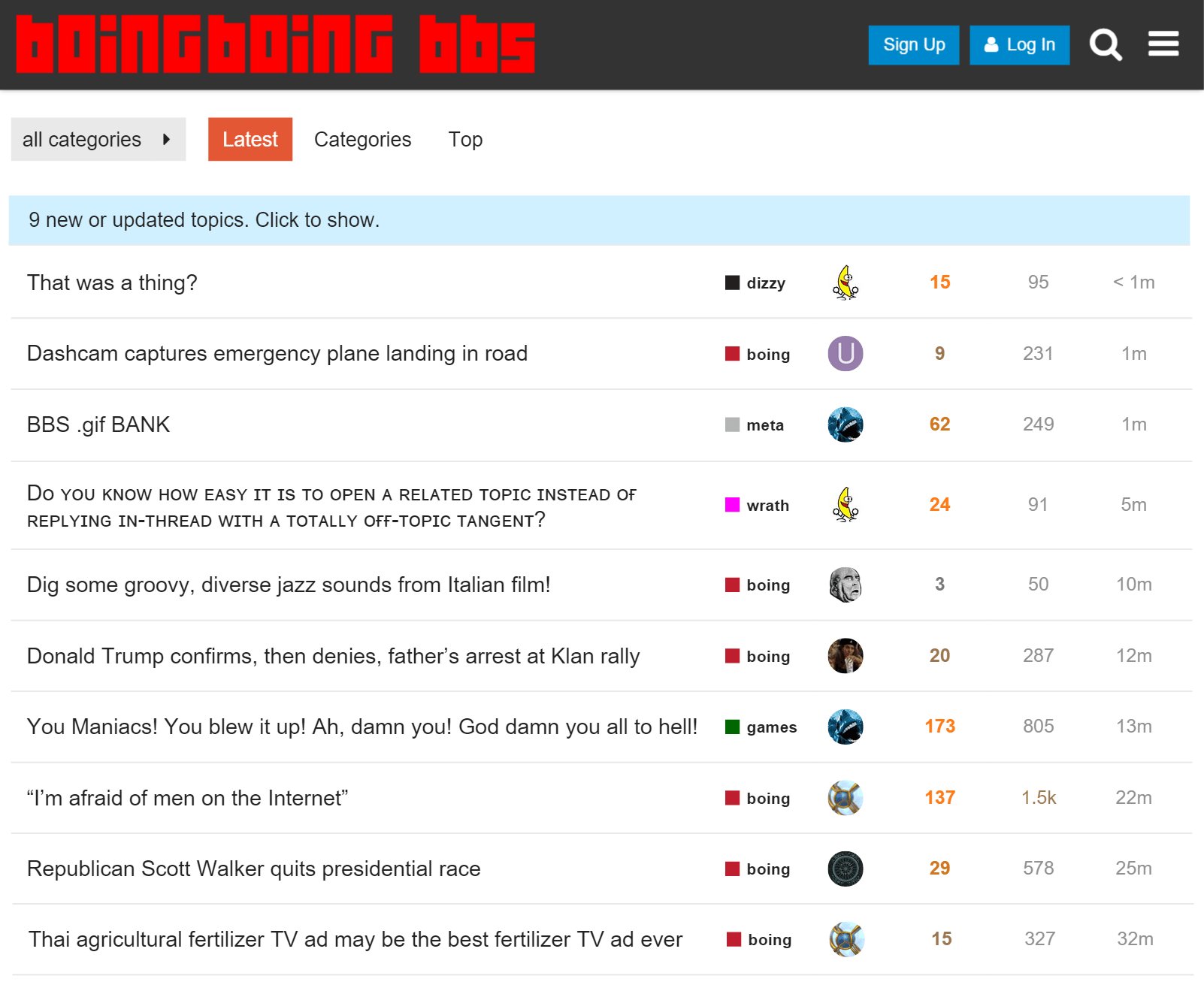
11、[discourse](https://hellogithub.com/periodical/statistics/click?target=https://github.com/discourse/discourse):Ruby 语言写的论坛,百分之百开源、免费。
### 其它
12、[How-To-Ask-Questions-The-Smart-Way](https://hellogithub.com/periodical/statistics/click?target=https://github.com/ryanhanwu/How-To-Ask-Questions-The-Smart-Way):提问的智慧,提出一个好的问题是解决问题的关键
13、[jstraining](https://hellogithub.com/periodical/statistics/click?target=https://github.com/ruanyf/jstraining):阮一峰写的全栈工程师培训材料
14、[macOS-Security-and-Privacy-Guide](https://hellogithub.com/periodical/statistics/click?target=https://github.com/drduh/macOS-Security-and-Privacy-Guide):MacOS 的安全和隐私指南,[中文翻译版](https://github.com/xitu/macOS-Security-and-Privacy-Guide/blob/master/README-cn.md)
15、[PTVS](https://hellogithub.com/periodical/statistics/click?target=https://github.com/microsoft/PTVS):Visual Studio 下的 Python 开发插件
16、[styleguide](https://hellogithub.com/periodical/statistics/click?target=https://github.com/fex-team/styleguide):百度前端研发团队的文档与源码编写风格
17、[the-swift-programming-language-in-chinese](https://hellogithub.com/periodical/statistics/click?target=https://github.com/SwiftGGTeam/the-swift-programming-language-in-chinese):中文版 Apple 官方 Swift 教程《The Swift Programming Language》
『上一期』 | 反馈和建议 | 『下一期』
---
👉 来!推荐开源项目 👈
微信中搜:HelloGitHub 关注公众号
不仅能第一时间收到推送,还有回馈粉丝的活动
如果文中的图刷不出来,可以点击 这里。
## 赞助
## 声明

本作品采用 署名-非商业性使用-禁止演绎 4.0 国际 进行许可。