# 🐛 Debugging
## Command
[`error.command`](api.md#resultcommand) contains the file and [arguments](input.md#command-arguments) that were run. It is intended for logging or debugging.
[`error.escapedCommand`](api.md#resultescapedcommand) is the same, except control characters are escaped. This makes it safe to either print or copy and paste in a terminal, for debugging purposes.
Since the escaping is fairly basic, neither `error.command` nor `error.escapedCommand` should be executed directly, including using [`execa()`](api.md#execafile-arguments-options) or [`parseCommandString()`](api.md#parsecommandstringcommand).
```js
import {execa} from 'execa';
try {
await execa`npm run build\ntask`;
} catch (error) {
console.error(error.command); // "npm run build\ntask"
console.error(error.escapedCommand); // "npm run 'build\\ntask'"
throw error;
}
```
## Duration
```js
try {
const result = await execa`npm run build`;
console.log('Command duration:', result.durationMs); // 150
} catch (error) {
console.error('Command duration:', error.durationMs); // 150
throw error;
}
```
## Verbose mode
### Short mode
When the [`verbose`](api.md#optionsverbose) option is `'short'`, the [command](#command), [duration](#duration) and [error messages](errors.md#error-message) are printed on [`stderr`](https://en.wikipedia.org/wiki/Standard_streams#Standard_error_(stderr)).
```js
// build.js
await execa({verbose: 'short'})`npm run build`;
```
```
$ node build.js
[20:36:11.043] [0] $ npm run build
[20:36:11.885] [0] ✔ (done in 842ms)
```
### Full mode
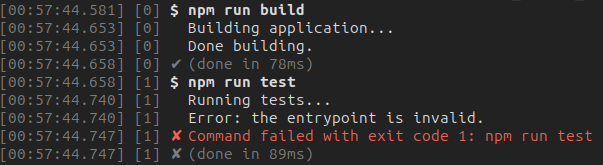
When the [`verbose`](api.md#optionsverbose) option is `'full'`, the subprocess' [`stdout`, `stderr`](output.md) and [IPC messages](ipc.md) are also logged. They are all printed on [`stderr`](https://en.wikipedia.org/wiki/Standard_streams#Standard_error_(stderr)).
The output is not logged if either:
- The [`stdout`](api.md#optionsstdout)/[`stderr`](api.md#optionsstderr) option is [`'ignore'`](output.md#ignore-output) or [`'inherit'`](output.md#terminal-output).
- The `stdout`/`stderr` is redirected to [a stream](streams.md#output), [a file](output.md#file-output), [a file descriptor](output.md#terminal-output), or [another subprocess](pipe.md).
- The [`encoding`](api.md#optionsencoding) option is [binary](binary.md#binary-output).
```js
// build.js
await execa({verbose: 'full'})`npm run build`;
await execa({verbose: 'full'})`npm run test`;
```
```
$ node build.js
[00:57:44.581] [0] $ npm run build
[00:57:44.653] [0] Building application...
[00:57:44.653] [0] Done building.
[00:57:44.658] [0] ✔ (done in 78ms)
[00:57:44.658] [1] $ npm run test
[00:57:44.740] [1] Running tests...
[00:57:44.740] [1] Error: the entrypoint is invalid.
[00:57:44.747] [1] ✘ Command failed with exit code 1: npm run test
[00:57:44.747] [1] ✘ (done in 89ms)
```
### Global mode
When the `NODE_DEBUG=execa` [environment variable](https://en.wikipedia.org/wiki/Environment_variable) is set, the [`verbose`](api.md#optionsverbose) option defaults to `'full'` for all commands.
```js
// build.js
// This is logged by default
await execa`npm run build`;
// This is not logged
await execa({verbose: 'none'})`npm run test`;
```
```
$ NODE_DEBUG=execa node build.js
```
### Colors
When printed to a terminal, the verbose mode uses colors.
## Custom logging
### Verbose function
The [`verbose`](api.md#optionsverbose) option can be a function to customize logging.
It is called once per log line. The first argument is the default log line string. The second argument is the same information but as an object instead (documented [here](api.md#verbose-object)).
If a string is returned, it is printed on `stderr`. If `undefined` is returned, nothing is printed.
### Filter logs
```js
import {execa as execa_} from 'execa';
// Only print log lines showing the subprocess duration
const execa = execa_({
verbose(verboseLine, {type}) {
return type === 'duration' ? verboseLine : undefined;
},
});
```
### Transform logs
```js
import {execa as execa_} from 'execa';
// Prepend current process' PID
const execa = execa_({
verbose(verboseLine) {
return `[${process.pid}] ${verboseLine}`;
},
});
```
### Custom log format
```js
import {execa as execa_} from 'execa';
// Use a different format for the timestamp
const execa = execa_({
verbose(verboseLine, {timestamp}) {
return verboseLine.replace(timestampRegExp, timestamp.toISOString());
},
});
// Timestamp at the start of each log line
const timestampRegExp = /\d{2}:\d{2}:\d{2}\.\d{3}/;
```
### JSON logging
```js
import {execa as execa_} from 'execa';
const execa = execa_({
verbose(verboseLine, verboseObject) {
return JSON.stringify(verboseObject);
},
});
```
### Advanced logging
```js
import {execa as execa_} from 'execa';
import {createLogger, transports} from 'winston';
// Log to a file using Winston
const transport = new transports.File({filename: 'logs.txt'});
const logger = createLogger({transports: [transport]});
const LOG_LEVELS = {
command: 'info',
output: 'verbose',
ipc: 'verbose',
error: 'error',
duration: 'info',
};
const execa = execa_({
verbose(verboseLine, {message, ...verboseObject}) {
const level = LOG_LEVELS[verboseObject.type];
logger[level](message, verboseObject);
},
});
```
[**Next**: 📎 Windows](windows.md)\
[**Previous**: 📞 Inter-process communication](ipc.md)\
[**Top**: Table of contents](../readme.md#documentation)

 ## Custom logging
### Verbose function
The [`verbose`](api.md#optionsverbose) option can be a function to customize logging.
It is called once per log line. The first argument is the default log line string. The second argument is the same information but as an object instead (documented [here](api.md#verbose-object)).
If a string is returned, it is printed on `stderr`. If `undefined` is returned, nothing is printed.
### Filter logs
```js
import {execa as execa_} from 'execa';
// Only print log lines showing the subprocess duration
const execa = execa_({
verbose(verboseLine, {type}) {
return type === 'duration' ? verboseLine : undefined;
},
});
```
### Transform logs
```js
import {execa as execa_} from 'execa';
// Prepend current process' PID
const execa = execa_({
verbose(verboseLine) {
return `[${process.pid}] ${verboseLine}`;
},
});
```
### Custom log format
```js
import {execa as execa_} from 'execa';
// Use a different format for the timestamp
const execa = execa_({
verbose(verboseLine, {timestamp}) {
return verboseLine.replace(timestampRegExp, timestamp.toISOString());
},
});
// Timestamp at the start of each log line
const timestampRegExp = /\d{2}:\d{2}:\d{2}\.\d{3}/;
```
### JSON logging
```js
import {execa as execa_} from 'execa';
const execa = execa_({
verbose(verboseLine, verboseObject) {
return JSON.stringify(verboseObject);
},
});
```
### Advanced logging
```js
import {execa as execa_} from 'execa';
import {createLogger, transports} from 'winston';
// Log to a file using Winston
const transport = new transports.File({filename: 'logs.txt'});
const logger = createLogger({transports: [transport]});
const LOG_LEVELS = {
command: 'info',
output: 'verbose',
ipc: 'verbose',
error: 'error',
duration: 'info',
};
const execa = execa_({
verbose(verboseLine, {message, ...verboseObject}) {
const level = LOG_LEVELS[verboseObject.type];
logger[level](message, verboseObject);
},
});
```
## Custom logging
### Verbose function
The [`verbose`](api.md#optionsverbose) option can be a function to customize logging.
It is called once per log line. The first argument is the default log line string. The second argument is the same information but as an object instead (documented [here](api.md#verbose-object)).
If a string is returned, it is printed on `stderr`. If `undefined` is returned, nothing is printed.
### Filter logs
```js
import {execa as execa_} from 'execa';
// Only print log lines showing the subprocess duration
const execa = execa_({
verbose(verboseLine, {type}) {
return type === 'duration' ? verboseLine : undefined;
},
});
```
### Transform logs
```js
import {execa as execa_} from 'execa';
// Prepend current process' PID
const execa = execa_({
verbose(verboseLine) {
return `[${process.pid}] ${verboseLine}`;
},
});
```
### Custom log format
```js
import {execa as execa_} from 'execa';
// Use a different format for the timestamp
const execa = execa_({
verbose(verboseLine, {timestamp}) {
return verboseLine.replace(timestampRegExp, timestamp.toISOString());
},
});
// Timestamp at the start of each log line
const timestampRegExp = /\d{2}:\d{2}:\d{2}\.\d{3}/;
```
### JSON logging
```js
import {execa as execa_} from 'execa';
const execa = execa_({
verbose(verboseLine, verboseObject) {
return JSON.stringify(verboseObject);
},
});
```
### Advanced logging
```js
import {execa as execa_} from 'execa';
import {createLogger, transports} from 'winston';
// Log to a file using Winston
const transport = new transports.File({filename: 'logs.txt'});
const logger = createLogger({transports: [transport]});
const LOG_LEVELS = {
command: 'info',
output: 'verbose',
ipc: 'verbose',
error: 'error',
duration: 'info',
};
const execa = execa_({
verbose(verboseLine, {message, ...verboseObject}) {
const level = LOG_LEVELS[verboseObject.type];
logger[level](message, verboseObject);
},
});
```